Verizon Family
- 4.4
- Rating
- 1.00M
- Installs
- Free
- Price

 Analysis by App-foxy
I see Verizon Family as a practical family-safety app rather than a general-purpose parenting guide. It brings screen-time supervision, location awareness, and driving-related visibility into one place, which can be useful when a family wants fewer separate tools to check. I spent time looking at how that combination fits into ordinary routines, and my overall impression is that it works best when everyone understands what is being monitored and why.
The app is free and belongs to the lifestyle category, with Verizon Consumer Group listed as its developer. It is available for everyone from an age-rating perspective, although the people being supervised will usually be children or teenagers. Its store summary focuses on parental controls and family location features, but the more important question is how those tools affect day-to-day communication. In my experience, an app like this is most helpful when it supports an existing family agreement instead of quietly replacing one.
How Verizon Family fits into everyday family life
The current appeal is easy to understand. A parent may want to know whether a child arrived at school, reduce distractions during homework, or keep an eye on driving habits without switching among unrelated services. Verizon Family puts those concerns under one family-oriented umbrella. That makes it more approachable than assembling separate screen-time controls, location tools, and driving apps.
You May Also Like

 Blood Strike: 2.5 Anniversary
Blood Strike’s Loadouts Turn Every Drop Into a Tactical Gamble
A close look at Blood Strike’s custom loadouts: how fast access to signature weapons reshapes its battle royale rhythm, rewards preparation, and narrows the gap between fights.

 Pandora - Music & Podcasts
Pandora’s Music Is Easy to Start, but Harder to Recover
Pandora’s strength is its low-effort path from a seed to a station. Its weak spot is how much confidence it asks you to place in connection, setup, and quiet recovery.

 8 Ball Pool
 Is Built on Rivalries, Rematches, and Routine
A close look at the rivalries, rematches, shared routines, and unanswered safety questions that turn a quick pool match into a persistent mobile community.

 Samsung Music
’s Quiet Strength Is Playing What You Already Own
Its reach comes less from spectacle than from dependable access to a personal library. That simplicity is both the app’s strongest retention engine and its ceiling.

 AccuWeather: Weather Radar
AccuWeather Review: A Quick, Clear Forecast for Everyday Decisions
For everyday plans, the best forecast is the one you can understand quickly. AccuWeather makes rain timing, radar, and local conditions easy to act on, with a few trade-offs.

 Hill Climb Racing
Why Hill Climb Racing Still Turns Crashes Into One More Run
A tiny car, a bumpy hill and one more upgrade: Hill Climb Racing keeps resurfacing because its simple chaos makes every near-miss feel personal.
More From Our News Desk



A realistic example is a weekday afternoon. One parent is still at work, a teenager is leaving school, and a younger child needs to finish homework before using a phone for entertainment. Instead of sending several messages asking where everyone is or whether the assignment is finished, the parent can use the app as a central point of reference. Location information can help with arrival awareness, while screen-time controls can support the agreed homework routine. The value is not that the app eliminates conversation; it is that it can reduce repetitive checking.
I also think the driving angle gives the app a different purpose from a basic location-sharing tool. Families with a newly licensed driver may care less about seeing a dot on a map and more about having a broader picture of phone use and driving behavior. That said, parents should avoid treating any app as a substitute for clear driving rules. A dashboard can provide useful context, but it cannot make a risky decision disappear.
The app has been available since July 3, 2013, and that long presence helps explain why it feels like a mature family utility rather than a novelty. Its current store presence shows an average rating of 4.5 from around 34,000 ratings, with more than 1 million installs. I would read that as evidence of broad interest, not as a guarantee that every family will find the controls intuitive or suitable.
What the main tools are good for
Screen-time management is most useful when the goal is specific. “Use the phone less” is difficult to enforce consistently, while a defined homework period or bedtime routine gives the family something concrete to discuss. I would begin with one or two boundaries rather than trying to control every minute. Too many restrictions at once can turn the app into a source of arguments, especially with older children.
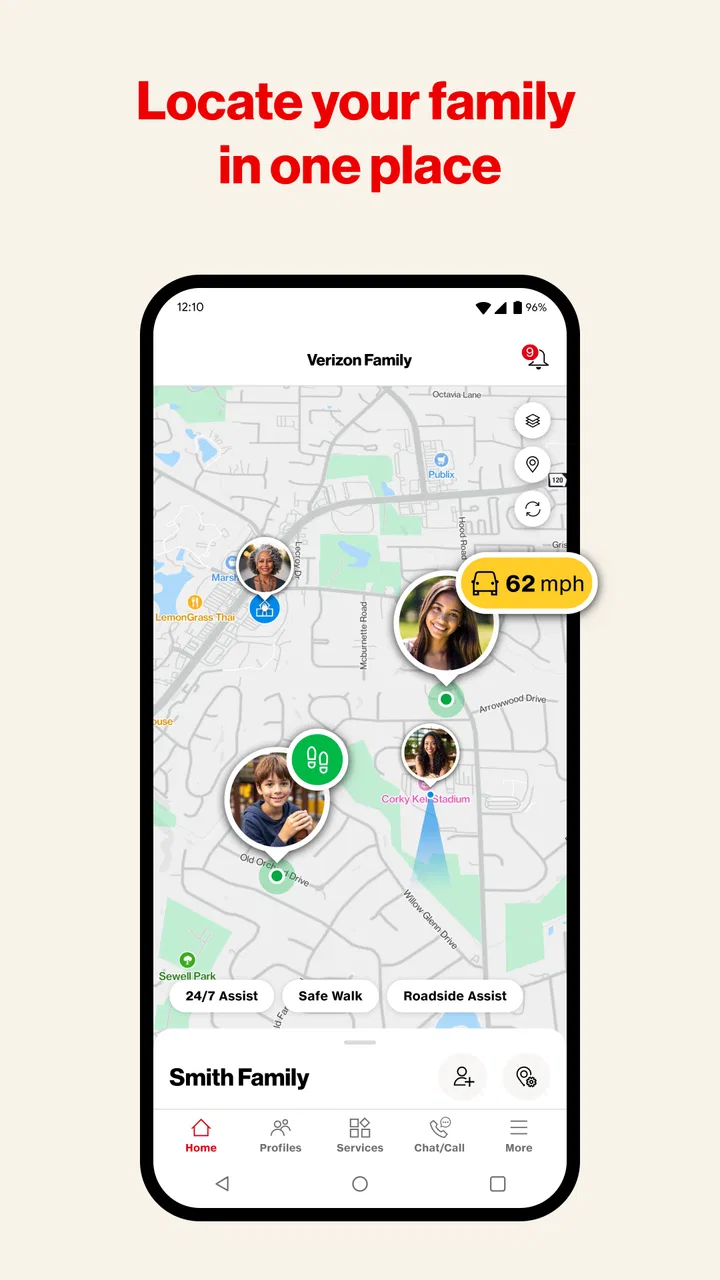
Location sharing is strongest for practical coordination. It can answer questions such as whether someone has reached a destination or is still on the way. I would not use it as a replacement for calling during an emergency, and I would explain to children when location information is being used. Trust matters here: a child who feels secretly watched may focus more on bypassing supervision than on making safer choices.
Driving-related monitoring can be useful for conversations after a trip. Instead of making a vague accusation about phone use in the car, a parent can use the available driving context to start a calmer discussion. The trade-off is that families need to agree on how that information will be interpreted. A single unusual trip should not automatically become a punishment, particularly when the app cannot provide the full human context behind every event.
One less obvious strength is the way these areas can be considered together. A location tool alone tells me where a family member is. A screen-time tool alone tells me something about phone use. Verizon Family is more useful when I connect those observations to a routine: school arrival, study time, evening travel, or a new driver’s first months on the road. That combined view is the reason I would choose it over a single-purpose tracker.
Setting it up without creating unnecessary conflict
The first setup conversation matters as much as the technical setup. I would explain which kinds of information the family intends to use, when the controls apply, and what happens if a child needs an exception. A location feature is easier to accept when it is framed around getting home safely rather than constant suspicion. The same is true of screen limits: children are more likely to cooperate when they know how to request extra time for homework, travel, or an important call.
I would also start with a short trial period. Use the app for one ordinary week, notice where the rules create friction, and then adjust them. This approach reveals whether the family actually needs constant location visibility or only arrival checks. It can also show whether screen-time restrictions interfere with legitimate school tasks. The best configuration is usually the least intrusive one that solves the family’s real problem.
A useful workflow is to review the app at a fixed time rather than checking it continuously. For example, a parent might look at the family overview after school and again in the evening, instead of repeatedly refreshing location information. That reduces anxiety and prevents the app from becoming a habit of surveillance. It also makes unusual activity easier to notice because the parent has a consistent baseline.
Another practical tip is to agree on what counts as an exception before one happens. If a teenager is delayed by a club meeting, a friend’s ride, or a changed school activity, the family should already know whether a message is enough or whether a parent will adjust a control. This keeps the app in a supporting role and avoids making every unexpected event feel like a technical violation.
How the app has evolved in practical terms
The confirmed release date places Verizon Family in a different era from many newer family-safety products. Since it first appeared, parental expectations have shifted from simple location sharing toward a wider mix of digital wellbeing, travel awareness, and driving supervision. The current positioning reflects that broader need by bringing those themes together instead of presenting the app as only a map or only a screen limiter.
I would be careful, however, not to confuse a long product history with proof that every part of the experience has changed in a particular way. What I can judge is the present direction: Verizon Family is organized around family coordination and supervision, not around entertainment or social networking. That focus is helpful because it keeps the purpose clear, but it also means the app may feel more structured than families who only want occasional location sharing.
For existing users, the broader scope can be an advantage if they previously relied on several disconnected habits. They may be able to move from checking a location service, manually discussing screen use, and separately worrying about driving to a more unified routine. The adjustment is that a wider toolset requires more thoughtful configuration. A family that activates everything immediately may create unnecessary alerts, misunderstandings, or resistance.
I would treat future changes with the same practical standard. New controls are valuable only if they make family decisions clearer or reduce daily effort. A feature that produces more information but no better conversation is not automatically an improvement. For this kind of app, reliability, understandable settings, and respectful control over family boundaries matter more to me than a long list of options.
Where it compares well with usual alternatives
The most obvious alternative is the built-in parental-control system on a phone. Those tools can be excellent for managing app use and basic device habits, and they may be the better choice for a parent who wants only screen-time limits. They are often closer to the operating system and can feel simpler for one device. Verizon Family becomes more compelling when the family also wants location and driving-related oversight in the same family setup.
A second alternative is a dedicated location-sharing service. That can be preferable for adults who want uncomplicated travel coordination without screen restrictions. If the only question is whether a partner arrived safely, a full parental-control app may feel excessive. Verizon Family is aimed more clearly at households where location is one part of a wider supervision plan.
There are also device-specific family ecosystems. These can be convenient when everyone uses compatible phones, but they may not address the same combination of location, screen time, and driving concerns in one place. I would choose Verizon Family when the family wants a single, recognizable family-safety workflow. I would choose a simpler built-in option when the household has a narrow goal and does not need the additional oversight.
The trade-off is centralization. One app can reduce the number of places a parent needs to check, but it also makes the app more important to the family routine. If the interface feels confusing or the family cannot agree on boundaries, the convenience disappears. In that situation, a smaller tool with fewer responsibilities may genuinely work better.
Limitations I would consider before installing it
The biggest limitation is not necessarily a missing button; it is the possibility of over-monitoring. Location and driving information can be reassuring, but constant observation can damage trust if it is used as a silent test of obedience. I would not recommend this app for a household that is unwilling to discuss privacy or explain the rules to older children.
There is also a judgment problem. Screen-time data can show device use, but it does not reveal whether that use was for school, an accessibility need, a family emergency, or harmless communication. Driving information can support a conversation, but it should not be treated as a complete account of a person’s attention or intent. Parents need to interpret what they see rather than reacting automatically.
Families should also think about the administrative burden. A tool covering several areas needs regular review as children grow, schedules change, and driving responsibilities develop. Rules that made sense for a younger child may become unnecessarily restrictive for a teenager. I would schedule occasional check-ins with the family, not just with the app, and remove controls that no longer serve a clear safety purpose.
Another limitation is fit. Adults who want private, mutual location sharing may find parental controls unnecessary. Parents who need highly specialized school-device management may prefer a dedicated service designed for that environment. Verizon Family makes the most sense in the middle: a family wants coordinated supervision across everyday phone use, whereabouts, and driving, but does not want to manage several unrelated products.
Questions I would settle before relying on it
If you are wondering whether it is suitable for younger children, my answer is yes in principle, provided the controls match the child’s maturity and the family explains them clearly. The age rating is Everyone, but that does not mean every setting is appropriate for every age. A younger child may need simple, predictable rules, while an older teenager may need more privacy and a greater role in deciding how the app is used.
If you are asking whether it replaces direct communication, I would say no. The app can make coordination easier, but it cannot explain why someone is late, whether a child is upset, or what kind of help they need. I would use it to reduce routine uncertainty, then keep calls and conversations available for situations that require judgment.
If you only want screen-time limits, I would first compare the app with the controls already available on the phone. Verizon Family is more attractive when its location and driving context are genuinely useful. Installing a broad family-safety tool for a single narrow task may add complexity without giving you a meaningful benefit.
If you are concerned about how to avoid constant checking, set a family routine before activating the features. Decide when information will be reviewed, what requires a message, and which situations justify a call. This turns the app from a live surveillance window into a shared safety tool. That distinction made the biggest difference in how useful I found it.
My recommendation for the right kind of household
I would recommend Verizon Family to parents who want one family-focused app for screen-time guidance, location coordination, and driving awareness. It is particularly well suited to households managing school schedules, children becoming more independent, or a newly licensed driver. The free price also makes it easy to try without first committing money, while the strong average rating and broad install base suggest that many families have found the concept worthwhile.
I would skip it if you only need occasional location sharing, if your phone’s built-in controls already solve the problem, or if the people being supervised do not agree with the arrangement. No family-safety app can compensate for unclear expectations. In some homes, fewer controls and more direct conversation will produce a healthier result.
What I would watch over time is not simply whether Verizon adds more features. I would look for improvements that make permissions, family roles, exceptions, and alerts easier to understand. Existing users benefit most when the app becomes less demanding to manage while remaining useful across changing ages and routines. That is the standard I would apply before expanding its role in my own household.
My final view is positive but measured. Verizon Family is a sensible lifestyle app for families that want connected supervision rather than a single isolated control. Its strongest idea is the combination of screen time, location, and driving awareness, while its main challenge is using that combination responsibly. Use it as a shared safety framework, not as a substitute for trust, context, or conversation. With that mindset, it can make everyday family coordination calmer and more organized.
FAQs for Verizon Family
01What is Verizon Family and what are its main features?
Verizon Family is an app designed to help parents manage and monitor their children’s online activities. Key features include location tracking, screen time management, and content filtering. The app also allows for setting up geofences to receive alerts when a child enters or leaves a designated area, ensuring peace of mind for parents.
02How does the location tracking feature work in Verizon Family?
The location tracking feature uses GPS technology to provide real-time updates on a child's whereabouts. Parents can view their child’s location on a map through the app, and set up geofences for specific areas. When a child enters or leaves these zones, notifications are sent to the parent's device, offering added security and convenience.
03Can Verizon Family help manage screen time for children?
Yes, Verizon Family includes robust screen time management tools. Parents can set daily time limits for device usage, schedule downtime during homework or bedtime, and monitor app usage. This helps in promoting healthy digital habits by ensuring children are not spending excessive time on their devices.
04Is content filtering available in Verizon Family, and how effective is it?
Verizon Family offers content filtering to block inappropriate websites and content. Parents can customize filters to suit their child’s age and maturity level. The app regularly updates its filters to keep up with new websites and content, making it an effective tool for maintaining a safe online environment for children.
05What devices and platforms is Verizon Family compatible with?
Verizon Family is compatible with both Android and iOS devices, making it versatile for households with different types of devices. It can be installed on smartphones and tablets, ensuring that parents have the flexibility to monitor and manage their children’s activities across multiple platforms seamlessly.
Pros
- User-friendly interface for easy navigation.
- Real-time location tracking for family members.
- Customizable alerts for safety zones.
- Parental controls for app usage monitoring.
- Battery life indicators for connected devices.
Cons
- Limited features on the free version.
- Location accuracy can vary.
- Requires constant internet connection.
- Some features drain battery quickly.
- Limited to Verizon network users.

Verizon Family
Gallery